
Description
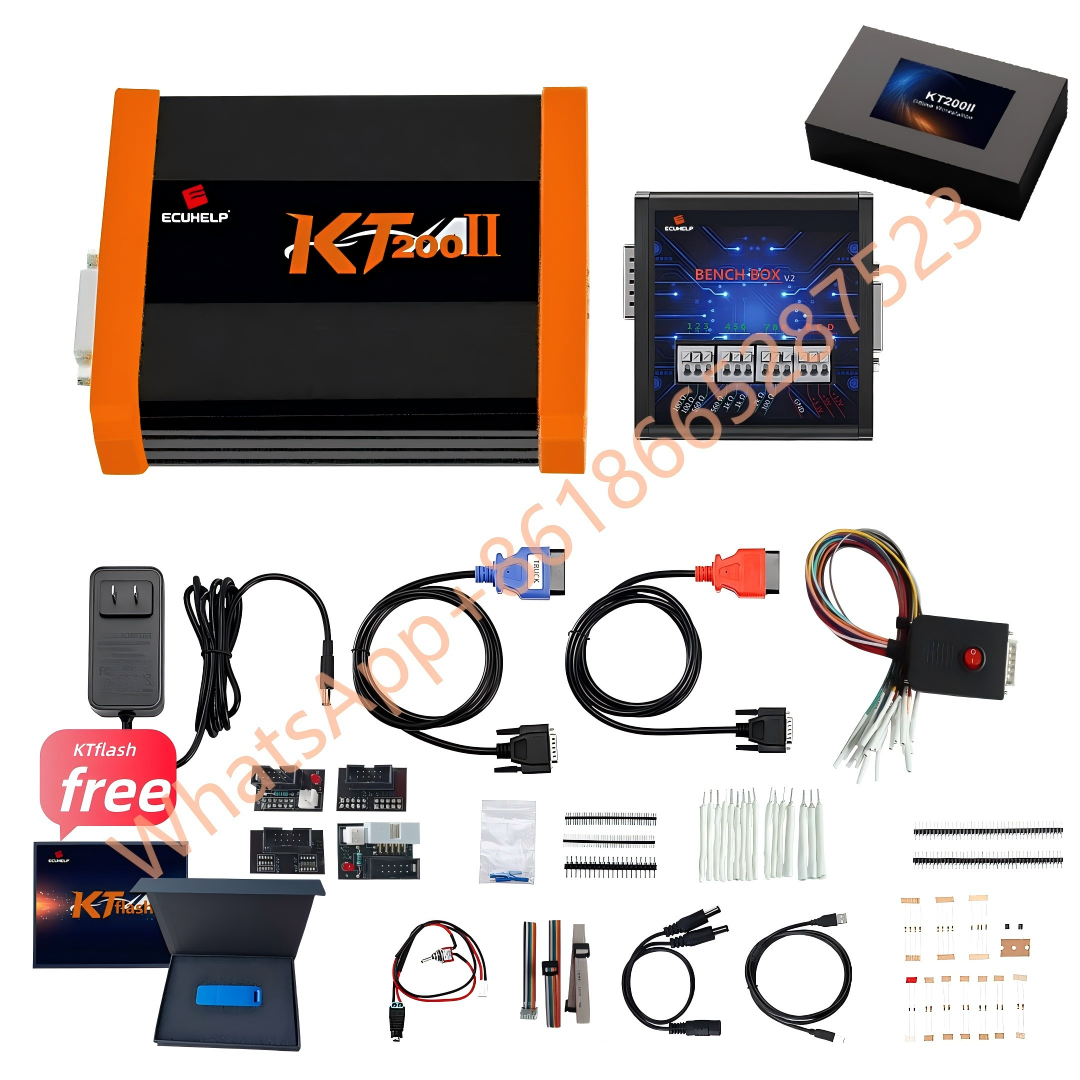
KT200II ECU Programmer – Professional ECU & TCU Programming Tool
KT200II is a professional ECU and TCU programming tool designed for automotive workshops, ECU repair technicians, chip tuning professionals, and vehicle electronics specialists. It supports a wide range of ECU and TCU operations through multiple connection methods, helping users read, write, back up, and service control units more efficiently.
With support for OBD, Bench, Boot, JTAG, BDM and other operation modes where listed in the supported database, KT200II gives technicians a flexible solution for different ECU and TCU programming scenarios.
Key Features
Professional ECU & TCU Programming
KT200II is built for ECU and TCU read/write operations on supported vehicles and control units. It is suitable for engine control units, transmission control units, and selected automotive electronic modules depending on the supported protocol and connection method.
Multiple Operation Modes
KT200II supports multiple programming methods according to the ECU or TCU type:
- OBD mode for convenient vehicle-side communication where supported
- Bench mode for direct ECU or TCU connection in workshop environments
- Boot mode for selected advanced ECU access and recovery operations
- JTAG and BDM modes for supported control units requiring direct technical access
Always check the supported vehicle list before operation to confirm the correct connection method.
Wide Vehicle & ECU Coverage
KT200II supports many vehicle brands, ECU brands, ECU types, microcontrollers, EEPROM types, and connection modes. The supported database helps users quickly confirm whether a specific vehicle, ECU, or TCU is compatible before purchase or operation.
Suitable for Workshop Use
KT200II is designed for daily professional use in automotive workshops, ECU repair businesses, tuning service centers, and vehicle electronics environments. It helps technicians handle ECU programming tasks with a clearer and more efficient workflow.
ECU Data Backup and Service Workflow
For supported ECUs and TCUs, KT200II can help users perform read, write, backup, verification, and programming-related operations. Making a backup before writing data is strongly recommended whenever supported by the ECU type and operation mode.
Online and Offline Software Options
KT200II software options may include online and offline versions depending on the product package and service requirements. Please download software from the official source and contact support if you are not sure which version to install.
Why Choose KT200II?
KT200II is a practical choice for users who need a professional ECU programming tool with broad compatibility and flexible operation modes. It is especially useful for technicians who work with different ECU types and need to select between OBD, Bench, Boot, JTAG, or BDM according to the supported vehicle list.
KT200II helps users:
- Check supported vehicles and ECU types before operation
- Choose the correct connection mode for each supported ECU or TCU
- Work with a structured ECU programming workflow
- Handle ECU and TCU service tasks in a professional workshop environment
- Access support for software download, installation, activation, and compatibility questions
Available Versions
KT200II Basic Version
Suitable for users who need the essential KT200II ECU programming tool and basic supported functions.
KT200II Full Version
Recommended for workshops and professional users who need broader ECU and TCU programming coverage.
KT200II Ultimate Version
Designed for users who want a more complete package, including KT200II Full Version together with additional tool capability.
Important Compatibility Notice
KT200II compatibility depends on the vehicle model, ECU or TCU type, hardware version, software version, protocol support, and connection method. Not every vehicle supports every operation mode.
Before purchasing or using KT200II, please check the supported vehicle list or contact support with the following information:
- Vehicle brand
- Vehicle model
- Year
- Engine type
- ECU or TCU brand
- ECU or TCU type
- Required operation, such as read, write, backup, clone, or recovery
Professional Use Notice
KT200II is a professional automotive electronics tool. Incorrect operation may cause ECU damage, communication failure, data loss, or vehicle faults. Users should have basic ECU programming knowledge and follow the correct operation procedure.
For safe use:
- Use a stable power supply during ECU or TCU operations
- Confirm the correct connection method before operation
- Make a backup whenever possible
- Do not interrupt read/write operations
- Do not use unofficial or unknown software packages
- Use the tool only for legal and authorized automotive service purposes
Package and Support
After purchase, users can contact support for software download, installation guidance, activation assistance, vehicle compatibility confirmation, and operation mode questions.
For the best experience, please confirm your required vehicle or ECU support before purchasing.