
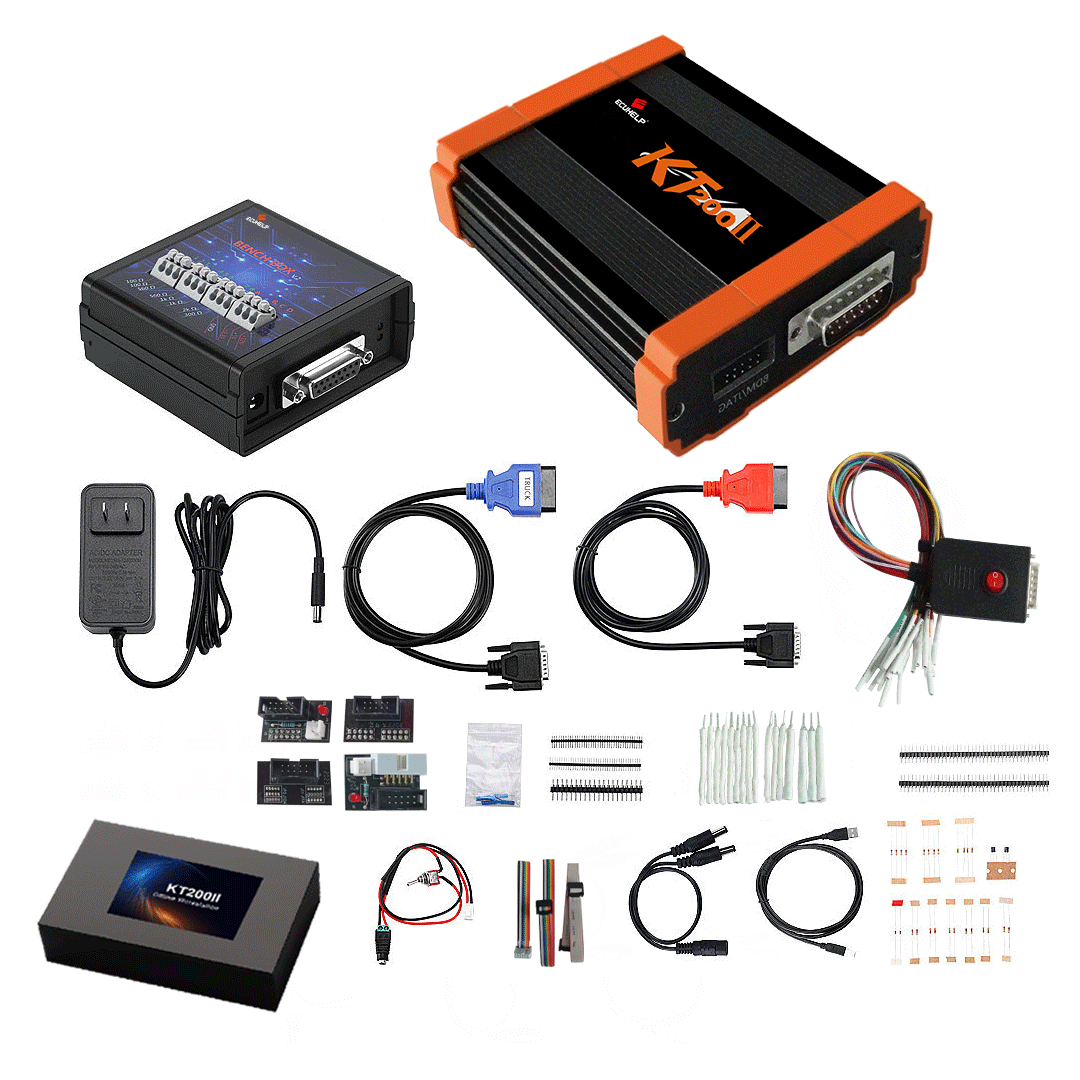
What Is KT200II? Professional ECU & TCU Programming Tool Explained
KT200II is a professional ECU and TCU programming tool designed for automotive workshops, ECU repair technicians, chip tuning professionals, and vehicle electronics specialists. It is used for supported ECU and TCU operations such as reading, writing, backing up, and servicing control unit data through different connection methods.
For many technicians, choosing an ECU programming tool is not only about the product itself. It is also about vehicle coverage, supported ECU types, software usability, operation modes, and after-sales support. KT200II is designed to help users work with different ECU and TCU systems in a more structured and flexible way.
This guide explains what KT200II is, what it is used for, which operation modes it supports, and what users should check before purchase or operation.
What Is KT200II?
KT200II is an ECU and TCU programming interface used for professional automotive electronic work. It connects to supported control units through different methods depending on the vehicle, ECU type, protocol, and supported operation.
In practical workshop use, KT200II may be used for supported operations such as:
- ECU reading
- ECU writing
- TCU reading and writing
- ECU backup
- ECU service work
- Supported programming operations
- Vehicle compatibility checking
- ECU and TCU workflow preparation
The exact function depends on the supported vehicle list, ECU or TCU type, software version, and available connection method.
Who Is KT200II For?
KT200II is mainly designed for professional and semi-professional users, including:
- Automotive workshops
- ECU repair shops
- Chip tuning businesses
- Vehicle electronics technicians
- Diesel and petrol tuning professionals
- ECU / TCU service specialists
- Technicians working with supported vehicle control units
It is not only a basic diagnostic tool. KT200II is intended for users who understand ECU and TCU programming risks, connection methods, backup procedures, and stable power supply requirements.
What Can KT200II Do?
KT200II can help technicians perform supported ECU and TCU programming tasks according to the supported database. Depending on the control unit, users may be able to access the ECU or TCU through OBD, Bench, Boot, JTAG, BDM, or other supported modes.
Common professional use cases include:
- Reading ECU data before modification or service
- Writing supported ECU or TCU data
- Creating backup files before operation
- Working with selected ECU and TCU systems
- Checking ECU brand, ECU type, microcontroller, EEPROM, and connection mode
- Preparing the correct workflow before programming
Before using KT200II on any vehicle or control unit, users should always check whether that vehicle or ECU is listed in the supported vehicle database.
KT200II Operation Modes Explained
Different ECUs and TCUs require different communication methods. One vehicle may support OBD communication, while another ECU may require Bench or Boot mode. KT200II supports different operation modes where listed in the supported database.
OBD Mode
OBD mode uses the vehicle diagnostic port for communication. It is usually the most convenient method when supported because the ECU can often remain installed in the vehicle.
OBD mode is useful for supported vehicle-side operations where the protocol allows communication through the diagnostic port.
Bench Mode
Bench mode uses direct connection to the ECU or TCU, usually outside the vehicle or through a controlled bench setup. It is commonly used in professional ECU service and programming workflows.
Bench mode is useful when the ECU or TCU requires direct access, or when a stable workshop setup is preferred.
Boot Mode
Boot mode is an advanced access method used on selected ECUs. It may provide deeper access to the ECU microcontroller when required by the ECU type or operation.
Boot mode should be performed carefully by users who understand ECU connection, power supply, and backup procedures.
JTAG Mode
JTAG is a direct technical access method used on selected control units. It is commonly associated with microcontroller-level communication and is usually intended for advanced users.
BDM Mode
BDM mode is used for selected ECU generations and control units requiring background debug mode access. It is typically used in professional ECU repair, backup, and service workflows.
Why Vehicle Compatibility Matters
Vehicle support is one of the most important factors before purchasing or using KT200II. A tool may support many brands and ECU types, but support still depends on the exact vehicle and control unit.
Before operation, users should confirm:
- Vehicle brand
- Vehicle model
- Vehicle year
- Engine type
- ECU or TCU brand
- ECU or TCU type
- Supported connection method
- Supported read/write operation
- Required KT200II version or accessories
Not every ECU supports every operation mode. For example, one ECU may support OBD, while another may require Bench or Boot mode. This is why checking the supported vehicle list is necessary before purchase or programming.
KT200II Basic, Full and Ultimate Versions
KT200II may be available in different versions depending on user needs.
KT200II Basic Version
The Basic Version is suitable for users who need essential KT200II functions and standard ECU programming workflows.
KT200II Full Version
The Full Version is recommended for workshops and professional users who need broader ECU and TCU programming coverage.
KT200II Ultimate Version
The Ultimate Version is designed for users who want a more complete package and extended tool capability, depending on the package configuration.
Before choosing a version, users should confirm which vehicle brands, ECU types, TCU types, and operation modes they need.
Software Download and Installation
KT200II software may include online and offline versions depending on the product package and service requirements. Users should download software from the official source and install it on a compatible Windows computer.
Before installing software, users should check:
- Correct software version
- Windows system compatibility
- Driver requirements
- Activation requirements
- Online or offline version requirement
- Support instructions from the official source
Using unofficial, modified, or unknown software may cause installation problems or device issues. Always use official or recommended download links.
Professional Use Notice
KT200II is a professional automotive electronics tool. Incorrect operation may cause ECU damage, communication failure, data loss, or vehicle faults. Users should understand the correct procedure before reading or writing any ECU or TCU.
For safer operation:
- Use a stable power supply
- Confirm the correct connection method
- Make a backup whenever possible
- Do not interrupt read/write operations
- Check the supported vehicle list before operation
- Use official software only
- Contact support when unsure
ECU and TCU programming should only be performed where legal and authorized.
Why Choose KT200II?
KT200II is a practical tool for users who need flexible ECU and TCU programming capability with multiple connection methods. It is especially useful for workshops and technicians who work with different ECU types and need to choose the correct operation method before service.
KT200II helps users:
- Work with supported ECU and TCU systems
- Confirm compatibility before operation
- Choose between OBD, Bench, Boot, JTAG and BDM where supported
- Use a professional ECU programming workflow
- Access support for software, activation, compatibility and operation questions
Before You Buy KT200II
Before purchasing KT200II, it is recommended to check the supported vehicle database or contact support with your vehicle and ECU details.
Send the following information for faster confirmation:
- Vehicle brand
- Vehicle model
- Year
- Engine type
- ECU or TCU brand
- ECU or TCU type
- Required operation, such as read, write, backup, clone, or recovery
This helps confirm whether your vehicle or control unit is supported and which KT200II version is suitable.
Conclusion
KT200II is a professional ECU and TCU programming tool for automotive workshops, ECU repair technicians, and tuning professionals. With support for multiple operation modes where listed in the supported database, it provides a flexible solution for different ECU and TCU service scenarios.
Before buying or using KT200II, always confirm vehicle compatibility, software requirements, operation mode, and product version. For uncertain cases, contact support before operation to reduce risk and choose the correct workflow.
FAQ
Does KT200II support OBD mode?
Yes, KT200II supports OBD operations for selected vehicles and ECUs where the protocol allows OBD access.
Does KT200II support Bench and Boot mode?
Yes, KT200II supports Bench and Boot operations for selected ECUs and TCUs where listed in the supported database.
Can KT200II program TCU modules?
KT200II supports selected TCU operations depending on the TCU type, vehicle model, and supported protocol.
Is KT200II suitable for beginners?
KT200II is a professional ECU and TCU programming tool. Beginners should learn the correct workflow, check compatibility, and contact support before advanced operations.
How do I know if my vehicle is supported?
Check the supported vehicle list or contact support with your vehicle brand, model, year, engine, ECU brand, and ECU type.




